How do I answer an OCR A Level Computer Science trace table question?
What is a trace table?
- Trace tables are used to follow the values of variables as a program runs
- These questions test your ability to simulate code line by line and accurately record outputs
Examiner Tips and Tricks
- You must read the code carefully and simulate it exactly as a computer would
- Use a pencil and annotate each step
- The most common mistake is skipping or misreading a line
What you need to know
- You may be asked to complete a trace table, explain a trace table, or spot errors in output
- These questions are normally worth 3–6 marks
- Most commonly appear in questions involving iteration, selection, and arrays/lists
- In most cases, the structure of the table is provided, your task is to complete the missing values
Command words to look out for
| Command word | What it means |
|---|---|
| Complete | Fill in the table with correct values |
| State | Give the value/output/result (usually a single word or number) |
| Explain | Say why something happens or changes in the program |
| Identify | Spot where something goes wrong or doesn’t match expectations |
How to tackle a trace table question
Follow these steps to answer trace table questions accurately:
-
Read the code carefully
Understand what each line does
Look out for loops, IF statements, and variable changes
-
Use the trace table provided
Use the headings and row count to guide how many iterations or steps are needed
-
Work line by line
Simulate the program in your head or on paper
Update each variable after every change
-
Watch out for variable resets
Variables declared inside loops often reset every time, don’t carry the wrong value across iterations
-
Show the final output clearly
If you’re asked for the output, make sure it’s written exactly as it would appear on screen
Worked example
Question
This algorithm checks whether a list of numbers contains a duplicate:
01 numList ← [4, 7, 2, 7]
02 foundDuplicate ← False
03 FOR i ← 0 TO LENGTH(numList) - 2
04     FOR j ← i + 1 TO LENGTH(numList) - 1
05         IF numList[i] = numList[j] THEN
06             foundDuplicate ← True
07         ENDIF
08     NEXT j
09 NEXT i
10 OUTPUT foundDuplicate
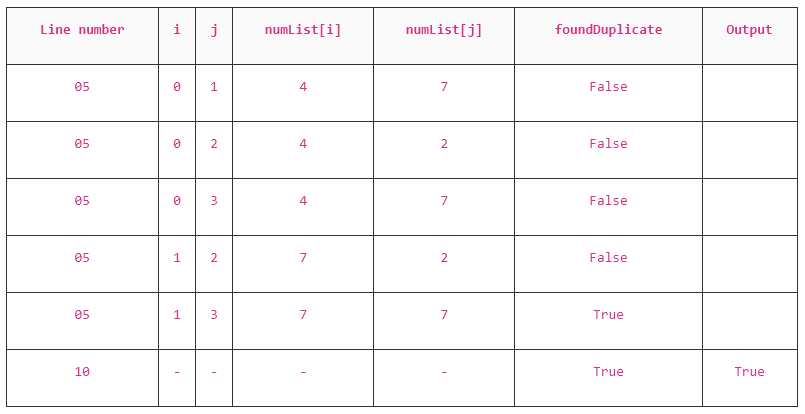
Complete the trace table below when the algorithm is run
You may not need to use all the rows in the table
Line number | i | j | numList[i] | numList[j] | foundDuplicate | Output |
|---|---|---|---|---|---|---|
-
Read the code carefully
- Line 1: Sets up a list of numbers:
[4, 7, 2, 7] - Line 2: A flag called
foundDuplicatestarts asFalse - Lines 3–9: Nested loops compare every pair of numbers in the list
- If a match is found,
foundDuplicatebecomesTrue
- If a match is found,
- Line 10: The final result is printed
Trueif a duplicate was found, otherwiseFalse
- Line 1: Sets up a list of numbers:
-
Use the trace table provided
- The trace table has six rows, showing all the important iterations of the loop and when
foundDuplicatechanges - Some rows may have repeated values if no changes happen
- If you reach the end and only used 2 or 3 rows, go back, you’ve likely missed a loop iteration
- The trace table has six rows, showing all the important iterations of the loop and when
-
Work line by line
05 IF numList[i] = numList[j] THEN4 ≠ 7, so no change
05 IF numList[i] = numList[j] THEN4 ≠ 2, so no change
05 IF numList[i] = numList[j] THEN4 ≠ 7, so no change
05 IF numList[i] = numList[j] THEN4 ≠ 7, so no change
05 IF numList[i] = numList[j] THEN7 = 7 → set
foundDuplicate = True10 OUTPUT foundDuplicateEnd of loops → output result
-
Watch out for variable resets
- Each loop changes both
iandjiincreases from 0 to 2jstarts ati + 1and goes up to 3
- Each loop changes both
-
Show the final output clearly
10 OUTPUT foundDuplicateTrue
Examiner Tips and Tricks
- You don’t need to fill in
Line 06(where the assignment happens), just show the change infoundDuplicate- Use a dash (–) when a column isn’t relevant (like
i,jafter the loops finish)- Add a comment column in the margin if you’re writing by hand, it helps show your thought process if you make a mistake