What is a binary search?
- The binary search is a more efficient search method than linear search
- The binary search compares the middle item to the searched for target item. If the values match then the index is returned. If not then the list is adjusted such that:
- the top half is ignored if the target item is less than the middle value
- or the bottom half is ignored if the target item is larger than the middle value
- Once the list has been adjusted, the search continues until the item is found or the item is not in the list
- It is important to note that the list must be sorted for the binary search to work correctly
Performing the binary search
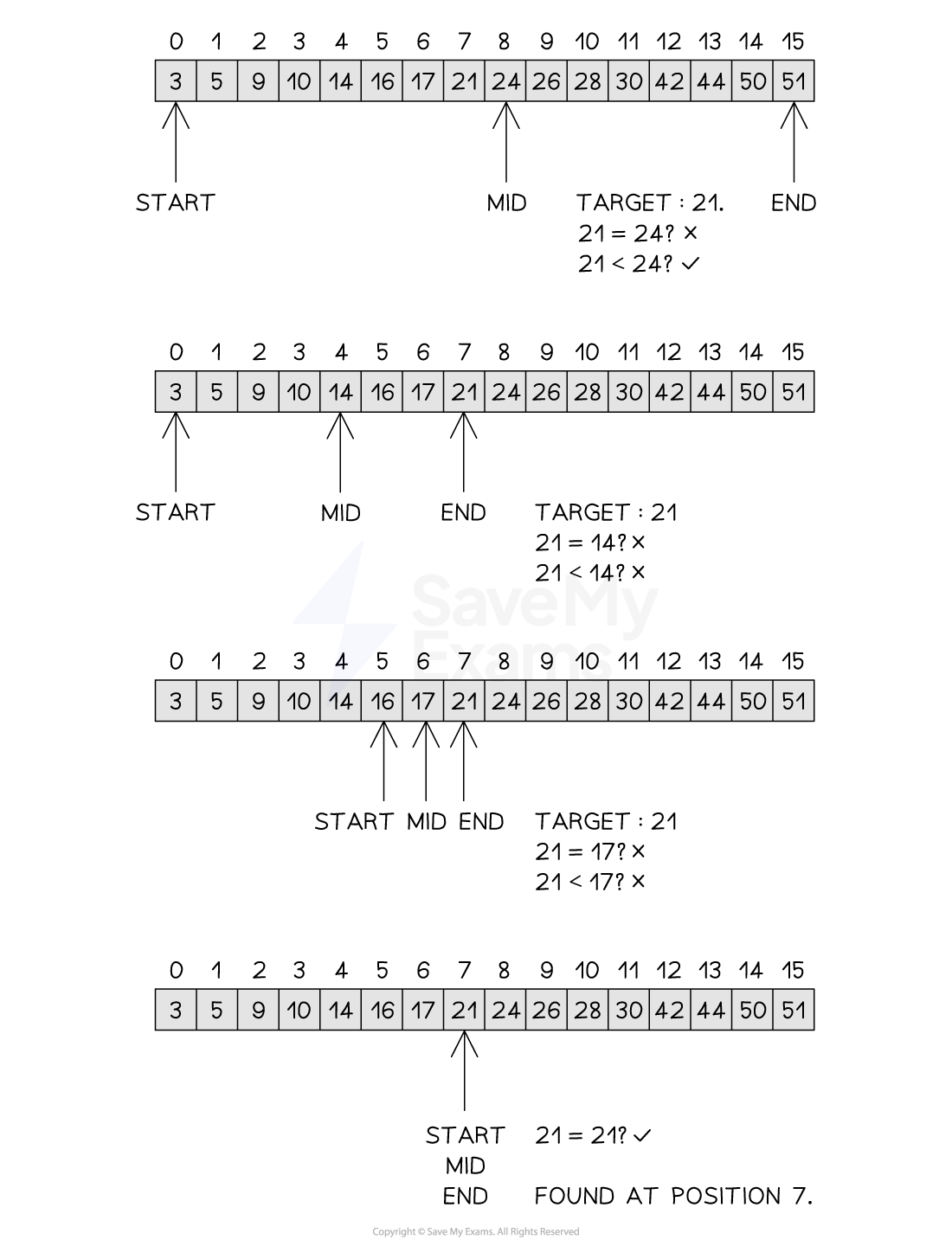 Figure 2: Performing the Binary Search
Examiner Tips and Tricks
- When determining the rounding of the midpoint, rounding up or down are both valid provided consistent use of the same rounding is used throughout the algorithm
- It is important to note that the binary search does not discard, delete or remove parts of the list, it only adjusts the start, end and mid pointers. This only gives the appearance that items have been discarded or deleted
Time complexity of a binary search
- The binary search is an example of a logarithmic time complexity O(logn) as it halves the search space with each iteration of the while loop. This approach is known as divide and conquer, where a problem is progressively reduced in size such that when each problem is at its smallest it is easiest to solve
- The algorithm starts with n items before the first iteration. After the first there are n/2 items, after the second there are n/4 items, after the third there are n/8 items and so on, leading to after i iterations
- The worst case scenario or maximum number of iterations to find one item is where
- Multiply both sides by to get:
- Take the logarithm of both sides:
- Rewrite with i at the front (using laws of logarithms):
- Log2 (assuming a base of 2 is used) becomes 1, giving:
- The binary search is therefore O(logn)
- The best case scenario would be O(1) where the item is found on the first comparison, while the average case would be which would find the item somewhere in the middle of the search. Removing coefficients means the average case would therefore still be O(logn)
Space complexity of a binary search
- Iterative binary search: O(1)
- It uses only a fixed number of variables (like start, end, and mid)
- It does not require additional memory that scales with the input size
- Recursive binary search: O(log n)
- Each recursive call is added to the call stack
- The maximum depth of recursion is proportional to log n, as the search space halves each time
Worked Example
The list of positive even numbers up to and including 1000 is 2, 4, 6,… 500, 502,… 998, 1000
An attempt is to be made to find the number 607 in this list.
Use the values given to show the first three steps for:
i. a binary search
ii. a serial search (linear)
How to answer this question:
i) Compare 607 with 500 (mid) [1] then discard the lower half. Compare 607 with 750 (mid) [1] then discard the upper half. Compare 607 with 625 [1] and discard the upper half
ii) Compare 607 with 2 [1] then move to the next number. Compare 607 with 4 [1] then move to the next number. Compare 607 with 6 [1] then move to the next number
It is acceptable and useful to use a diagram in your answer showing how the binary search and linear search functions. Use the illustrations above as an example of how to show this
Tracing a binary search
- Given the following list
[3, 5, 9, 10, 14, 16, 17, 21, 24, 26, 28, 30, 42, 44, 50, 51], a trace table for the binary search is shown below, with target value 21:
| Step | Start | End | Mid | list[mid] | Comparison | Result |
|---|---|---|---|---|---|---|
| 1 | 0 | 15 | 8 | 24 | 21 < 24 | Search lower half |
| 2 | 0 | 7 | 4 | 14 | 21 > 14 | Search upper half |
| 3 | 5 | 7 | 6 | 17 | 21 > 17 | Search upper half |
| 4 | 7 | 7 | 7 | 21 | 21 == 21 | Found at Index 7 |
Implementing a Binary Search
function binarySearch(list, item)
	found = False
	index = -1
	start = 0
	end = len(list - 1)
	while start <= last and found = False
		mid = round(start + end) / 2
		if list[mid] = item then
			found = True
			index = mid
		else
			if list[mid] < item then
				start = mid + 1
			else
				last = mid - 1
			endif
		endif
	endwhile
	return index
endfunction
- Initialisation: The function takes an ordered list and a target item. It sets
startandendpointers to the first and last indices of the list, whileindexis set to-1by default. - Midpoint Calculation: In each iteration, the algorithm calculates a
midindex. This effectively splits the current search area in two. - Comparison Logic: The value at the midpoint (
list[mid]) is compared to the targetitem. If they match, the search is successful, and thefoundflag is set toTrue. - Halving the Search Space: If the item is not found:
- If the target is greater than the midpoint value, the
startpointer moves tomid + 1, discarding the lower half of the list. - If the target is smaller than the midpoint value, the
endpointer moves tomid - 1, discarding the upper half.
- If the target is greater than the midpoint value, the
- Efficiency: This process repeats, effectively “shrinking” the list with every step. This logarithmic approach allows the algorithm to find items much faster than a linear search in large datasets.
- Termination: The loop continues until the item is found or the
startpointer exceeds theendpointer, at which point the finalindex(either the location or-1) is returned.
def binary_search(list, item):
	found = False
	index = -1
	start = 0
	end = len(list) - 1

	while start <= end and not found:
		mid = (start + end) // 2
		if list[mid] == item:
			found = True
			index = mid
		elif list[mid] < item:
			start = mid + 1
		else:
			end = mid - 1

	return index