Trees Data Structures
What is a tree?
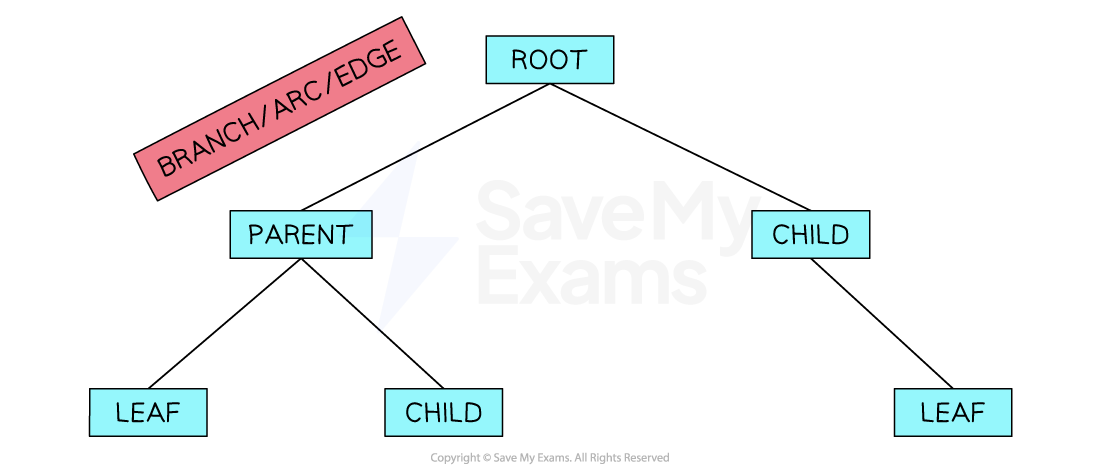
- A tree is a connected, undirected form of a graph with nodes and pointers
- Trees have a root node which is the top node; we visualise a tree with the roots at the top and the leaves at the bottom
- Nodes are connected to other nodes using pointers/edges/branches, with the lower-level nodes being the children of the higher-level nodes
- The endpoint of a tree is called a leaf
- The height of a tree is equal to the number of edges that connect the root node to the leaf node that is furthest away from it
 Trees
Trees
- Nodes are connected by parent-child relationships
- If a path is marked from the root towards a node, a parent node is the first one and the child node is the next
- A node can have multiple children
- A leaf node is a node with no children
- A null pointer shows that a node does not point to another node (for example, when a node has no children)
What are trees used for?
- Trees can be used for a range of applications:
- Managing folder structures
- Binary Trees are used in routes to store routing tables
- Binary Search Trees can be built to speed up searching
- Expression trees can be used to represent algebraic and Boolean expressions that simplify the processing of the expression
Traversing Tree Data Structures
What is a binary tree?
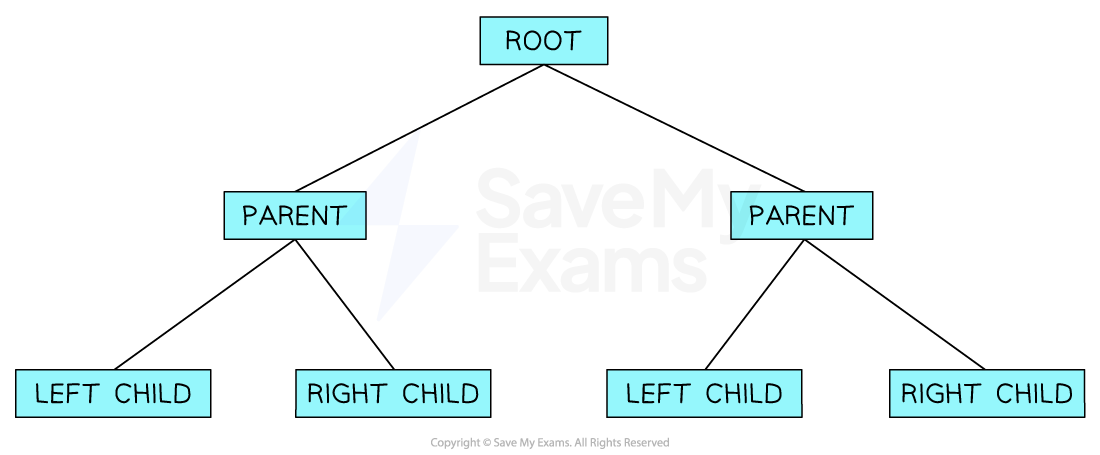
- A binary tree is a rooted tree where every node has a maximum of 2 nodes
- A binary tree is essentially a graph and therefore can be implemented in the same way
- For your A Level Computer Science exam, you must understand:
- tree traversal of a tree data structure
- add new data to a tree
- remove data from a tree
 Binary Trees
- The most common way to represent a binary tree is by storing each node with a left and right pointer. This information is usually implemented using 2D arrays
 Binary Trees 2
Tree traversal
- There are 2 methods of traversing a binary tree; depth-first and breadth-first
- Both are important to understand and you should be able to output the order of the nodes using both methods
Depth-first traversal of a binary tree
- There are 3 methods to traverse a binary tree using a depth-first traversal: Pre-Order, In-Order and Post-Order. For the OCR specification, you are only required to understand post-order traversal
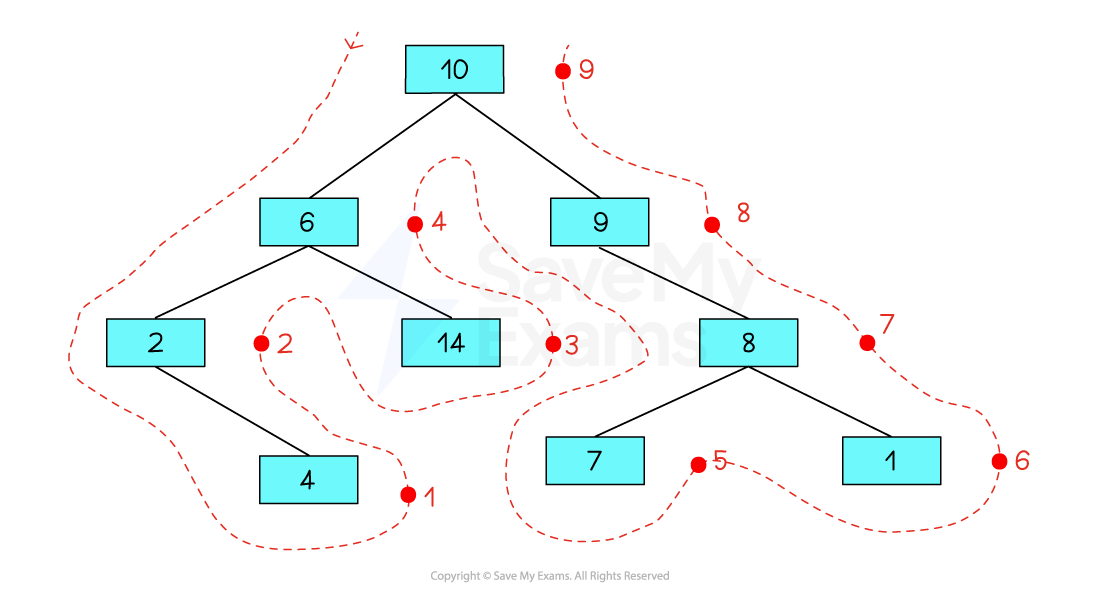
- Post-order traversal
- Left Subtree
- Right Subtree
- Root Node
- Using the outline method, imagine there is a dot on the right-hand side of each node
- Nodes are traversed in the order in which you pass them on the right
- Start at the bottom left of the binary tree
- Work your way up the left half of the tree
- Visit the bottom of the right half of the tree
- Making your way back up toward the root node at the top
 Tree Illustration
- The order of traversal is: 4, 2, 14, 6, 7, 1, 8, 9, 10
Breadth first traversal of a binary tree
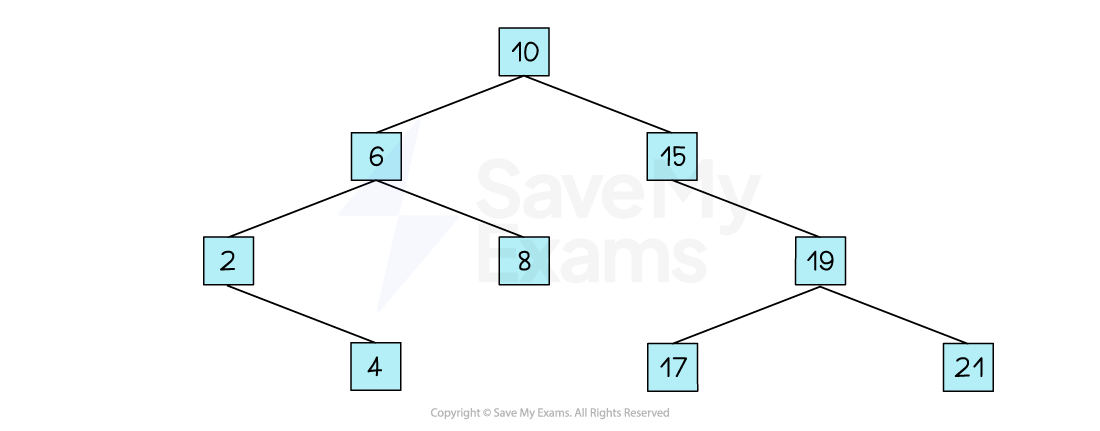
- The breadth-first traversal of a tree simply means to:
- Begin with the root node
- Move to the left-most node under the root
- Output each node, moving from left to right, just as though you were reading a book
- Continue through each level of the tree
 Searching Through a Binary Search Tree
- Using the image above, a breadth-first traversal would output: 10, 6, 15, 2, 8, 19, 4, 17, 21
Adding Data to a Tree
How do you add data to a binary tree?
- As mentioned above, a tree is a fundamental data structure in Computer Science and students must be able to understand how data can be added and removed in trees
- To add a value to a binary tree you need to complete the following:
-
Start with an empty tree or existing tree
 Adding to a Binary Tree 1
 -
Identify the position where the new value should be inserted according to the rules of a binary tree
- If the tree is empty, the new value will become the root node
- If the value is less than the current node’s value, move to the left child
- If the value is greater than the current node’s value, move to the right child
- Repeat this process until you reach a vacant spot where the new value can be inserted
 Adding to a Binary Tree 2
-
Insert the new value into the identified vacant spot, creating a new node at that position
 Adding to a Binary Tree 3
 -
After insertion, verify that the binary tree maintains its structure and properties
 Adding to a Binary Tree 4
Removing Data From a Tree
How do you remove data from a binary tree?
- To remove a value from a binary tree you need to complete the following:
-
Start with an existing tree
 Removing from a Binary Tree 1
 -
Search for the node containing the value you want to remove
 Removing from a Binary Tree 2
 -
If the node is found: a. If the node has no children (leaf node), simply remove it from the tree b. If the node has one child, replace the node with its child c. If the node has two children, find the replacement node by: - Option 1: Find the minimum value in its right subtree (or the maximum value in its left subtree) - Option 2: Choose either the leftmost node in the right subtree or the rightmost node in the left subtree. Remove the replacement node from its original location and place it in the position of the node to be deleted.
 Removing from a Binary Tree 3
 -
After removal, adjust the binary tree structure if necessary to maintain its properties and integrity
Tree keywords
| Keyword | Definition |
|---|---|
| Node | An item in a tree |
| Edge | Connects two nodes together and is also known as a branch or pointer |
| Root | A single node which does not have any incoming nodes |
| Child | A node with incoming edges |
| Parent | A node with outgoing edges |
| Subtree | A subsection of a tree consisting of a parent and all the children of a parent |
| Leaf | A node with no children |
| Traversing | The process of visiting each node in a tree data structure, exactly once |