HTML, or Hypertext Markup Language, is the foundational language used to structure content on the web
HTML consists of a series of elements, often referred to as “tags,” which can be used to structure and format a webpage
The <html> tag is the root element of an HTML page. The tag includes all other HTML elements used on the page
Most tags are opened and closed e.g.<html> and </html> whereas some tags are only opened e.g.<img> and <link>
The content layer of a web page is made up of HTML elements such as headings (<h1>, <h2>, etc.), paragraphs (<p>), links (<a>), images (<img>), and more
Examiner Tips and Tricks
An exam question which asks you to write HTML is asking you to write code which is specifically HTML. This means all spelling and syntax MUST be correct for you to get the marks
The head
The head section contains information about the web page that’s not displayed on the page itself
The head section is enclosed by <head> and </head> tags
Some of the content inside the head tag is shown in the browser tab
Page title
The <title> element is used to set the page title that shows in the browser tab
The crown is placed inside the <head> section of the HTML document
E.g.
<title>Sample Webpage</title>
External stylesheet
External stylesheets are linked in the <head> section using the <link> element
The rel attribute is set to “stylesheet”, and the href attribute contains the relative file path to the CSS file
Stylesheets are loaded in the order they are listed, so hierarchy is important
The body section contains the main content of the web page, such as text, images, videos, hyperlinks, tables etc.
The body section is enclosed by <body> and </body> tags
The content inside the body tag is displayed in the browser window
Headings
Headings help users understand how a page is organised and structured. They help guide the user’s eye around the page and help them quickly find the information they’re looking for
Headings are also important for users that use screen readers, such as visually-impaired users. Screen reader software uses headings to help the user navigate around the page (e.g. providing a list of all the headings on the page, and allowing the user to jump straight to a particular heading)
The tags used for headings are<h1>, <h2>, <h3> etc.
<h1> is the highest level heading, with <h2> and <h3> serving as subheadings
The number in the tag denotes the level of the heading. Headings should be used hierarchically, with <h1> the most prominent, and <h6> the least prominent
Headings are also important for Search Engine Optimisation (SEO), as they help search engines like Google understand the content and structure of the page
E.g.
<h1>Welcome to My Sample Webpage</h1><h2>About This Page</h2>
Images
The <img> tag embeds an image into an HTML document
The img tag includes the src attribute which specifies the URL of the image (the source of the attribute), and the alt attribute which provides alternative text for screen readers or in cases where the image cannot be displayed. The tag also helps search engines understand the content of the image
The height and width attributes specify the dimensions of the image
E.g.
<img src="https://cdn.savemyexams.com/logo/sme-logo-small.svg" alt="Save My Exams Image" height="100" width="200">
Links
The <a> tag, or anchor tag, is used to create hyperlinks
The tag includes the href attribute which specifies the URL that the link points to
This can be included within another tag to specify the text which will be displayed
E.g.
<p>Visit the <a href="https://www.savemyexams.co.uk">Save My Exams site</a> for more information.</p>
The <script> tag is used to embed or reference JavaScript code within an HTML document
E.g.
<script src="script.js"></script>
Examiner Tips and Tricks
It’s important to note that the correct usage of relative paths/URLs depends on the file structure and organisation of your web project. Carefully consider the relative relationship between files and directories to ensure accurate referencing of resources
Classes & Identifiers in HTML
Classes and identifiers (IDs) can be used to specify an HTML element
A class can have many HTML elements
An ID specifies a unique ID for an HTML element
Only 1 element can have the ID
A class or an ID can have specific styling applied to it in the CSS
E.g.
<body> <div id="header"> <h1>Study Guide</h1> </div> <div class="subject" id="maths"> <h2>Maths Revision</h2> <p>Key topics to revise are algebra, trigonometry, and statistics.</p> </div> <div class="subject" id="english"> <h2>English Revision</h2> <p>Focus on improving your grammar, vocabulary, and essay writing skills.</p> </div> <div class="subject" id="science"> <h2>Science Revision</h2> <p>Remember to revise the core concepts in physics, chemistry, and biology.</p> </div></body>
Styling is covered in more detail in CSS but here’s an example to illustrate the use of classes and IDs:
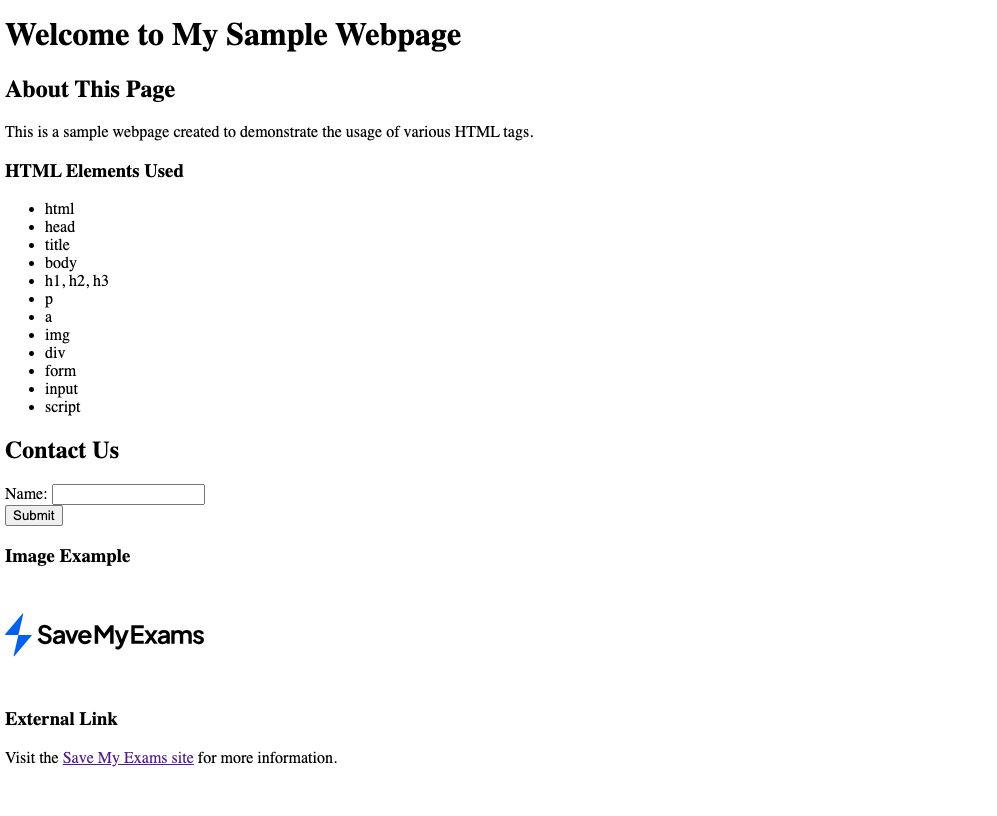
Here’s an example webpage and the HTML code written to create it:
This is the code for this webpage:
<!DOCTYPE html><html><head> <title>Sample Webpage</title> <link rel="stylesheet" type="text/css" href="styles.css"></head><body> <h1>Welcome to My Sample Webpage</h1> <h2>About This Page</h2> <p>This is a sample webpage created to demonstrate the usage of various HTML tags.</p> <h3>HTML Elements Used</h3> <ul> <li>html</li> <li>head</li> <li>title</li> <li>body</li> <li>h1, h2, h3</li> <li>p</li> <li>a</li> <li>img</li> <li>div</li> <li>form</li> <li>input</li> <li>script</li> </ul> <h2>Contact Us</h2> <form action="/submit_form" method="post"> <div> <label for="name">Name:</label> <input type="text" id="name" name="name"> </div> <div> <input type="submit" value="Submit"> </div> </form> <h3>Image Example</h3> <img src="https://cdn.savemyexams.com/logo/sme-logo-small.svg" alt="Save My Exams Image" height="100" width="200"> <h3>External Link</h3> <p>Visit the <a href="https://www.savemyexams.co.uk">Save My Exams site</a> for more information.</p></body><script src="script.js"></script></html>
Worked Example
One page in the website contains a hyperlink on an image. When the image stored as “ticket.png” is clicked, the user is hyperlinked to the page stored as “booking.htm”.
Write the HTML code to implement this hyperlink.
3 marks
How to answer this question:
You can use the example code from above to write the link:
You’ll need to change the link to the one given in the question (booking.htm) and change the image name to the one given in the question too (ticket.png)
The marks are awarded for:
Correct <a> with closing </a>
href property to correct page
Correct <img> tag with src property to correct file
Answer:
Example answer:
<a href="booking.htm"><img src="ticket.png"></a>
Examiner Tips and Tricks
When you’re given a link or filename in the question, make sure you copy it exactly as it appears. Your case (capital letters) and spelling need to be spot on to make sure you don’t drop marks!