What is hashing?
- Hashing is a method to convert any data into a fixed-size string of characters
- This fixed-size output is often called a digest
 Hashing Simple Diagram
- Same input will always produce the same hash, providing consistency
- Even a minor change in input produces a radically different hash, giving it sensitivity to data changes
| Input Text | Hashing Algorithm | Truncated Hash Digest |
|---|---|---|
| ”hello123” | SHA-256 | 8d9389d5a0375bd6b028bc0368003333 |
| ”hello124” | SHA-256 | 9ac12bac3a0843a1917b1c4a0f77a76d |
| ”applepie” | SHA-256 | 6395fc6a2522f7a27f5bdc7e31026fb6 |
| ”bpplepie” | SHA-256 | af2c27fca1755bf0f7ff55a51a166ed5 |
| ”password1” | SHA-256 | e99a18c428cb38d5f260853678922e03 |
| ”password2” | SHA-256 | ad0234829205b9033196ba818f7a872b |
Some common hashing algorithms are MD5, SHA-1, SHA-256, and SHA-3.
Comparison of encryption and hashing
Hashing and encryption both turn readable data into an unreadable format, but the two technologies have different purposes.
| Encryption | Hashing | |
|---|---|---|
| Purpose | Securing data for transmission or storage; reversible | Data verification, quick data retrieval, irreversible |
| Reversibility | Can be decrypted to the original data | It cannot be reversed to the original data |
| Keys | Uses keys for encryption and decryption | No keys involved |
| Processing Speed | Generally slower for strong encryption methods | Generally faster |
| Use Cases | Secure communications, file storage | Password storage, data integrity checks |
| Algorithm Types | Symmetric, Asymmetric | MD5, SHA-1, SHA-256, etc. |
| Security | Varies; potentially strong but dependent on key management | One-way function makes it secure but susceptible to collisions |
| Data Length | Output length varies; could be same or longer than input | Fixed length output |
| Change in Output | Small change in input results in significantly different output | Small change in input results in significantly different output |
| Typical Operations | Encrypt, Decrypt | Hash, Verify |
Hashing for password storage
- Hashing is commonly used for storing passwords
- When the user first signs up, the password they provide is hashed
- The hashed password is stored in the database, rather than as plaintext
- When users try to log in, they enter their username and password
- The system hashes the password entered by the user during the login attempt
- The hashed password is compared against the stored hash in the database
- If the hashes match, the user is authenticated and granted access
- If they don’t match, access is denied
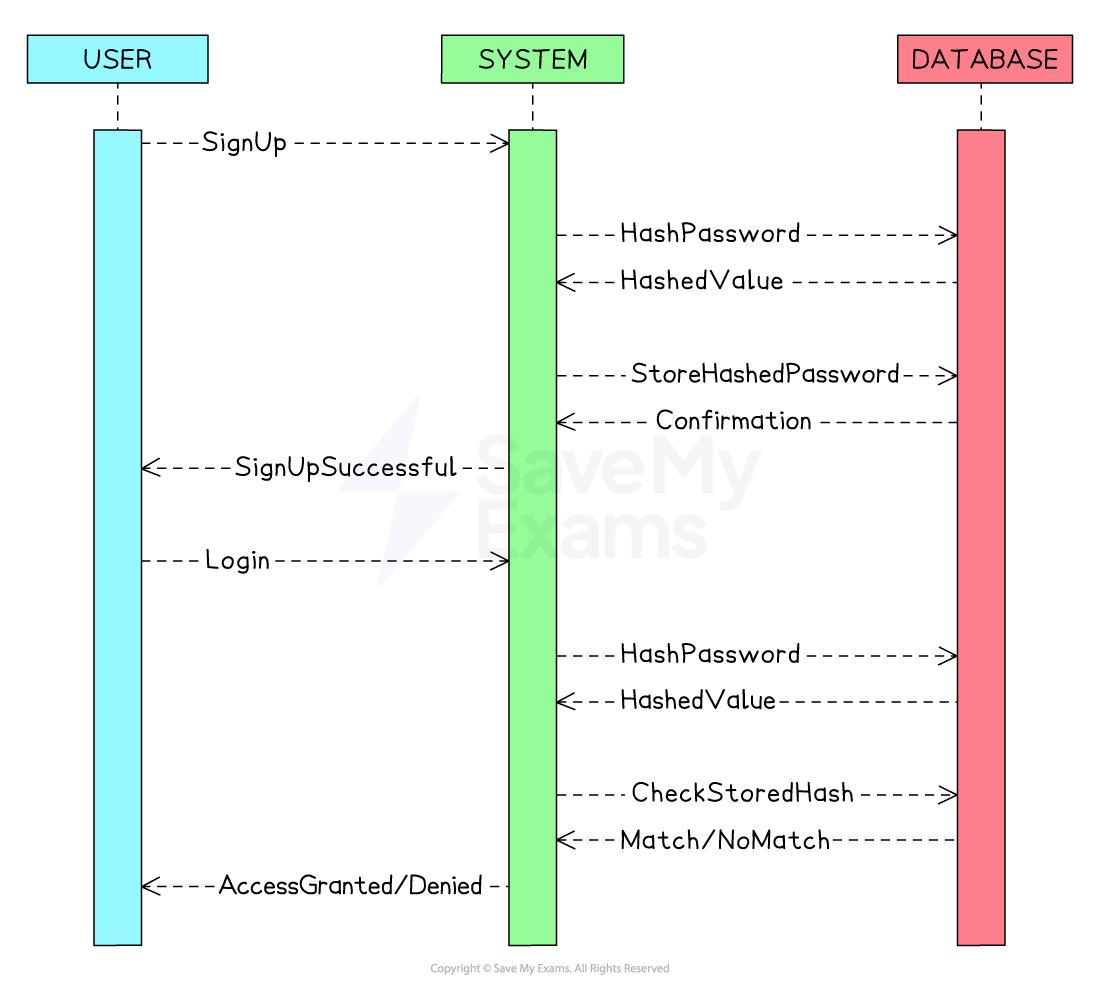 Hashing Passwords Website Authentication Sequence Diagram
- Hashing passwords adds an extra layer of security
- Even if the database is compromised, the attacker can’t use the hashed passwords directly
- In case of a data breach, not storing passwords in plaintext minimises the risk and potential legal repercussions
- Users’ raw passwords are not exposed, reducing the impact of a data breach
- Since the hash function always produces the same output for the same input, verifying a user’s password is quick
Why is hashing an efficient method for data retrieval?
Database lookup
- A good hash function uniformly distributes keys across the hash table, allowing for a more balanced and efficient data retrieval
- In the example below, the hashed Users table for a website is shown
- A hash table has no inherent order, as entries are placed according to the result of the hash function rather than sorted by any attribute
- New users are distributed across the table based on their hash value, giving a broadly uniform spread of entries
- If the website application needs to fetch the user’s data from the table, it is computationally more efficient to query using the hash digest value than any other attribute
- This is because the hash digest directly determines the index where the data is stored, typically allowing (constant-time) average lookup
| Hash Table Index | 0 | 1 | 2 | 3 | 4 |
|---|---|---|---|---|---|
| Hash Digest | ab1c2d | ef8g9h | i1j2k3 | l4m5n6 | o7p8q9 |
| Email Address | Aarav@ | Mei@ | Sven@ | Fatima@ | Tariq@ |
| Sign-Up Date | 8/8/22 | 11/11/22 | 2/2/22 | 6/6/22 | 5/5/22 |
- The hash digest serves as a summarised representation of the data (email address in the above example)
Data integrity
- Another benefit of hashing data is being able to verify its integrity
- When data is being transferred over a network, it is susceptible to loss of packets or malicious interference, so if two hashes are compared and are identical, it allows a system to verify the integrity of data
- This is because the same data hashed by the same hashing function will produce the same digest
- Comparing two fixed-size hashes is computationally less intensive than string comparison
Worked Example
A developer is designing a network security system. She is developing a component that logs websites users can access. This software records the websites’ URLs and details about the allowed users and their access times.
For each website, the following details are captured:
- Required user rank (A-D)
- If it’s accessible 24/7 (true) or only during breaks and outside office hours (false)
For instance, a website that can be accessed by users of rank B and higher throughout the day would have the data
[B, true]associated with it.A site that ranks C and above users but only outside office hours would be recorded as
[C, false].Identify an appropriate data structure to keep the details of a single website.
[1]
Answer:
Answer that gets full marks: Hash table or tuple.
Worked Example
Every website’s URL, along with its corresponding data, is saved in a hash map.
The hash function of this map processes the website’s URL (serving as the key). The hashing procedure is as follows:
- Remove characters up to and inclusive of the first dot.
- Eliminate characters from and after the next dot present.
- Convert the remaining string to uppercase.
- Sum up the ASCII values of the characters.
Given the ASCII values for the letters:
ASCII Values
As an example, consider the URL www.exam.net. The hashing process would be:
Step 1: exam.net
Step 2: exam
Step 3: EXAM
Step 4: 69 + 88 + 65 + 77 = 299
This results in a hashed value of 299.
State what hashed value would be given by the website www.foo.co.uk
[1]
How to answer this question: Follow the same steps as described in the question.
- Remove characters up to and inclusive of the first dot. Result: foo.co.uk
- Eliminate characters from and after the next dot present. Result: foo
- Convert the remaining string to uppercase. Result: FOO
- Sum up the ASCII values of the characters.
- F: 70
- O: 79
- O: 79 Sum: 70 + 79 + 79 = 228
Answer:
Answer that gets full marks: The sum of ascii values for www.foo.co.uk is 228.
Worked Example
Complete the function
hash, which takes in a string and returns the hashed value.You can assume you have access to the following three functions:
- asc() – this takes in a character and returns its ASCII value. For example,
asc("A")returns 65.- locate() – this takes in a string and character and returns the location of the first instance of the character (with the string starting at character 0). For example,
locate("electricity","c")returns 3.- upper() – this takes in a string and returns the UPPERCASE version. For example
upper("hello")returns “HELLO”.You should also assume that all website names use letters but no numbers or symbols.
function hash(siteName)

endfunction
[5]
How to answer this question:
- Understand the requirements:
- You are to create a hash function.
- Make use of the provided functions:
asc(),locate(), andupper().- Implement the hash function as described in the earlier content.
- Implement the steps:
- Discard characters up to and including the first dot.
- Discard characters including and to the right of the remaining leftmost dot.
- Convert the characters to uppercase.
- Add the ASCII values of the characters together.
Answer:
Answer that gets full marks:
function hash(siteName)
    firstDot = locate(siteName, ".")
    remainingString = siteName[firstDot+1:]

    secondDot = locate(remainingString, ".")
    requiredString = upper(remainingString[:secondDot])

    sum = 0
    for char in requiredString
        sum += asc(char)
    endfor

    return sum
endfunction
Acceptable answers you could have given instead:
function hash(siteName)
    parts = siteName.split(".")
    if len(parts) > 2:
        keyString = upper(parts[1])
    else:
        return -1  // handle error or unexpected input

    sum = 0
    for char in keyString
        sum += asc(char)
    endfor

    return sum
endfunction