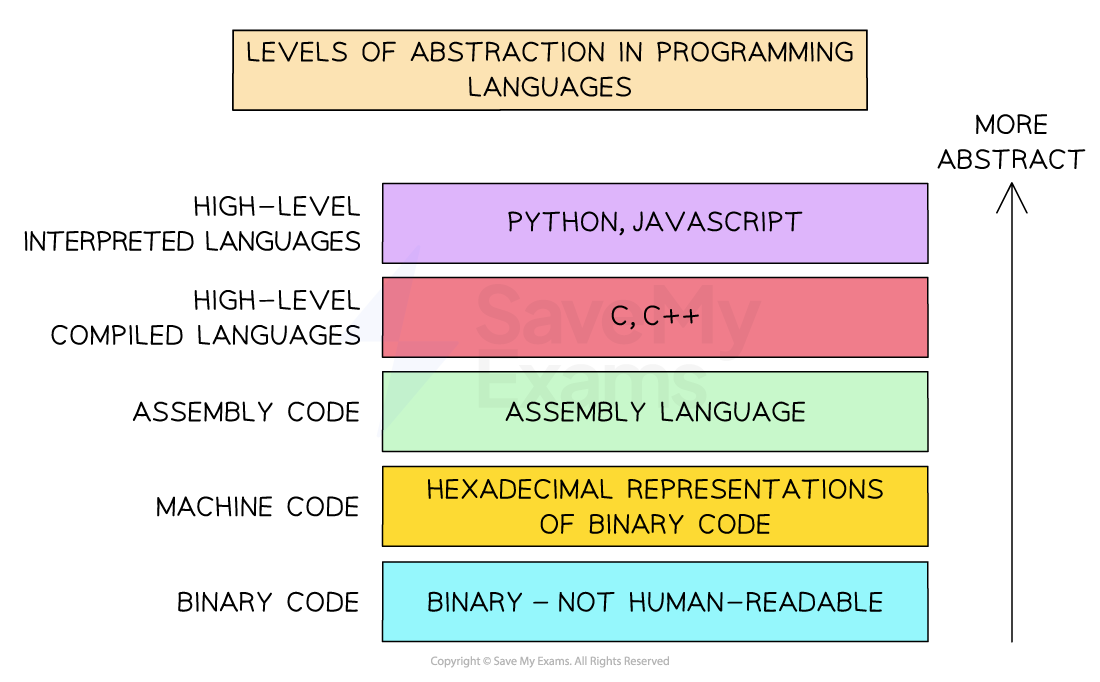
Assembly language sits between high-level languages (like Python, Java) and machine code (binary code executed by the computer hardware)
Allows developers to write more efficient, albeit far more complex, code when compared to high-level languages
Direct access and manipulation of hardware components, e.g., registers, memory addresses
Each type of computer CPU has its specific assembly language, e.g. x86 or ARM
Levels of Abstraction of Programming Languages
Little Man Computer
The Little Man Computer (LMC) is a hypothetical computer model used for understanding the fundamental operations and mechanics of a computer
The LMC is a simplified version of a computer
It has key elements like memory, a calculator, an accumulator, and an instruction set
Little Man Computer instruction set
Mnemonic
Instruction
Alternative Mnemonic
ADD
Add
SUB
Subtract
STA
Store
STO
LDA
Load
LOAD
BRA
Branch always
BR
BRZ
Branch if zero
BZ
BRP
Branch if positive OR zero
BP
INP
Input
IN, INPUT
OUT
Output
HLT
End program
COB, END
DAT
Data location
Example 1: Add two numbers
INP; // Input the first numberSTA 90; // Store the first number in memory location 90INP; // Input the second numberADD 90; // Add the number in memory location 90 to the accumulatorOUT; // Output the resultHLT; // End the programDAT; // Memory location 90 for storing data
Example 2: Find the largest of three numbers
This program inputs three numbers and determines the largest of the three, outputting the result.
INP // Input the first numberSTA 91 // Store the first number in memory location 91INP // Input the second numberSTA 92 // Store the second number in memory location 92INP // Input the third numberSTA 93 // Store the third number in memory location 93LDA 91SUB 92BRP compare13 // If the first number is greater than or equal to the second, compare it to the thirdLDA 92SUB 93BRP output2 // If the second number is greater than or equal to the third, output itLDA 93OUTHLTcompare13 LDA 91SUB 93BRP output1 // If the first number is greater than or equal to the third, output itLDA 93OUTHLToutput1 LDA 91OUTHLToutput2 LDA 92OUTHLTDATDATDAT
How it works:
This worked example demonstrates branching logic and how comparisons are chained to identify the correct result using SUB and BRP
Inputs are stored in memory locations 91, 92, and 93
The program first checks if the first number ≥ second number
If so, it then checks the first vs third
If not, it checks if the second number ≥ third number
The value that is greatest is loaded into the accumulator and output
Worked Example
A digital thermostat has a CPU that uses the Little Man Computer Instruction Set.
The thermostat allows users to set a desired room temperature. The acceptable range for room temperature settings is between 15 and 25 degrees Celsius, inclusive. If the user sets a temperature within the range, the code outputs a 1 indicating a valid setting. If the temperature setting is outside of the acceptable range, the code outputs a 0 indicating an invalid setting.
The code is as follows:
INPSTA tempSettingLDA tempSettingSUB minTempBRP checkMax // If tempSetting ≥ 15, check against maxLDA invalidValBRA endcheckMax LDA maxTempSUB tempSettingBRP isValid // If maxTemp - tempSetting ≥ 0, input is validLDA invalidValBRA endisValid LDA validValend OUTHLTvalidVal DAT 1invalidVal DAT 0minTemp DAT 15maxTemp DAT 25tempSetting DAT
a) What is the purpose of the labelcheckMaxin the code? Describe its role in determining the validity of the temperature setting.
[2]
b) If a user inputs a temperature setting of14, what will be the output? Justify your answer.
[2]
c) If the acceptable range of temperature settings was expanded to include temperatures up to 30 degrees Celsius, what modification would be needed in the code?
[2]
Answer:
Example answer that gets full marks:
a) The label checkMax marks the section of code that checks whether the temperature setting is less than or equal to the maximum allowed value (25).
It is used to continue validation only after confirming that the input is greater than or equal to the minimum temperature (15).
If the temperature is within range, the program continues from checkMax to determine if it is also below the maximum; otherwise, it skips this section.
b) The output will be 0.
This is because 14 is less than the minimum allowed value of 15.
The program compares the input to the minimum temperature first, and since 14 is below 15, it does not continue to checkMax and instead loads and outputs the invalid value (0).
c) The value stored at the maxTemp label should be changed from 25 to 30.
This allows the program to correctly validate temperatures up to and including 30 degrees when comparing the input against the maximum allowed temperature.
Acceptable answers you could have given instead:
a) Any response mentioning that checkMax it is for checking if the user’s input is below or equal to the maximum allowable temperature should be awarded marks.
b) Any answer stating that the output will be 0 because 14 is less than 15, or similar logic, should be awarded marks.
c) Any answer suggesting a change to the maxTemp DAT value to 30 should be awarded marks.
 Levels of Abstraction of Programming Languages