How do we measure CPU performance?
- There are 3 main ways in which CPU performance can be measured:
- Clock speed
- Number of cores
- Cache
Clock speed
- The clock in the computer controls operations within the CPU. It repeatedly changes from 0 to 1 to 0 and so on - each one of these is referred to as a state change
- A state change can represent one fetch execute cycle although some take more than one cycle
- Clock speed is a measure of how many states changes the CPU performs per second. 1 cycle per second = 1 Hz
- A modern high-end CPU may have a clock speed of 5 GHz = 5,000,000,000 Hz which is just over 5 billion cycles per second (modern range is about 3-6GHz)
- If a computer has a higher clock speed, it will be able to execute more instructions per second and therefore carry out tasks more quickly
- However, increasing clock speed leads to higher power consumption and heat generation, which can be limiting factors
Number of cores
- A core is an independent processing unit within the CPU
- A single core processor has one core but a computer can have a dual core processor, quad core processor or octa core processor, with server CPUs reaching around 192 cores
- Normally each core will run at the same speed
- Multicore processors complete work more quickly than single-core processors because each core can handle its own task at the same time, a technique known as parallel processing
- However, a dual-core processor isn’t simply twice as fast as a single core, since some time is lost coordinating tasks between the cores
- The overall speed also depends on the type of task: tasks that cannot be divided among multiple cores won’t benefit from extra cores, meaning a single-core may perform just as well
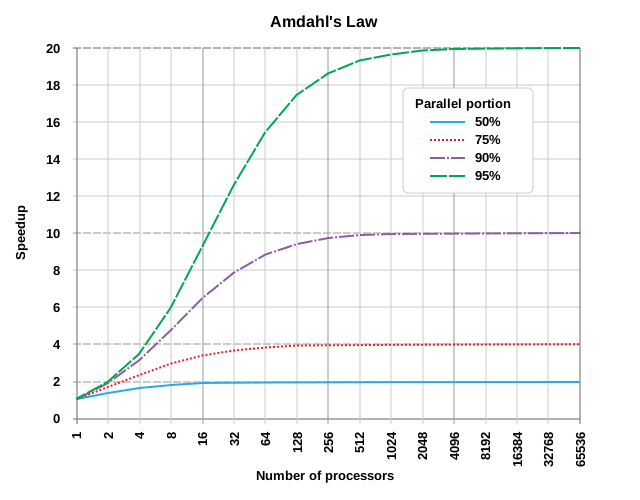
Amdahl's Law
The principle governing this is Amdahl’s Law, which states that the potential speedup of a programme from parallelisation is limited by the portion of the task that must be executed sequentially.
Amdahl’s Law equation: Note: You do not need to know Amdahl’s Law for the exam
Cache
- The cache is small, high-speed primary storage located in the CPU, used to store frequently used data and instructions
- This locality, being close to the CPU, makes it fast for fetching data
- A larger cache allows the CPU to store more data that can be quickly retrieved, reducing the need to fetch data from the slower main memory (RAM)
- More cache can significantly improve performance, especially in tasks involving repetitive data access (e.g., loops or frequently used calculations)
- E.g. A website you visit often will be stored in the cache so that the next time you visit the website it can load it up more quickly. When the webpage is updated, what is stored in the cache will be updated too
- The cache is split into different levels - each level is different in size and speed
- Level 1 - Fastest, smallest
- Level 2
- Level 3 - Slowest, largest
 Diagram of the levels within the cache